Tilt control iPhone only
stop betting
on tilt.
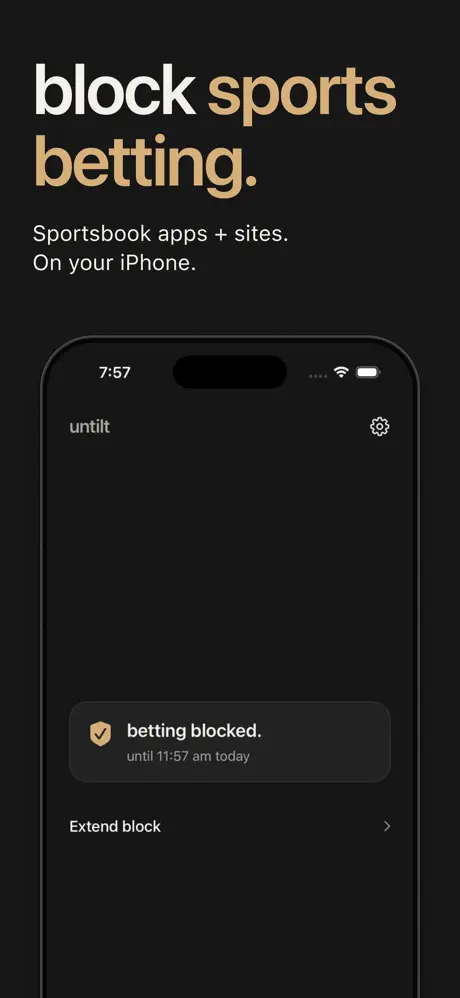
Put a lock between a bad beat and your next bet. Untilt blocks covered betting apps after kickoff, so you can leave the chasing behind.

First hour free. No card, no account.
The next-app problem
Your sportsbook’s tools stop at the edge of their app.
Tilt doesn’t.
A bad night can follow you from one app to the next. Untilt adds guardrails across 50 betting apps and 50 sites on your iPhone, including sportsbooks and Kalshi.
One phone. Multiple operators. Not every app or site is covered.
A decision you make ahead of time
Set it before kickoff.
Forget it after.
Get Untilt.
Download on iPhone. No account, no login.
Pick your lock.
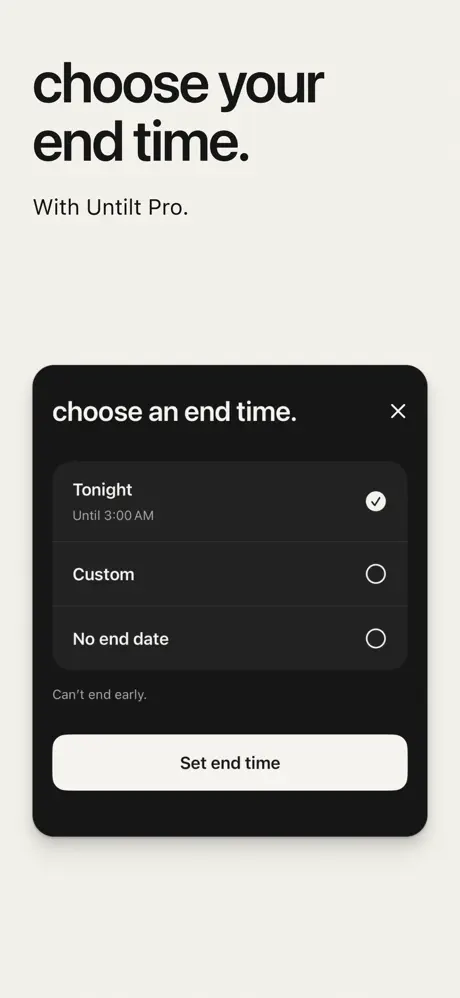
Choose Tonight, a custom date and time, or no end date with Pro. You see the end time before you start.
Hold to lock.
Allow Screen Time access, hold the button, done.
Your first hour is free. No card. Pro is a separate purchase.
Across your iPhone
50 apps.
50 sites.
One lock.
Sportsbooks, casinos, fantasy sports, and prediction markets. Already selected for you.
Including the apps you know
- DraftKings
- FanDuel
- BetMGM
- Kalshi
- Polymarket
- PrizePicks
50 app entries and 50 website entries. Not every operator is included. Other devices are not covered.
Still your game.
For bettors who
want to keep betting.
Just not impulsively at 11pm on a Tuesday. Untilt puts a little distance between the urge and the next bet.
Guardrails, not a lecture.
Untilt Pro
Cheaper than one tilted live bet.
Choose your end time. More locks, longer locks, and time added when you need it.
$6.99per month
$49.99per year
US prices. Final price shown in the App Store.
Auto-renews. Cancel your subscription anytime.
Want to try it first?
one free hour.
no card.
Try one 60-minute lock. No auto-charge. After that, Pro is a separate purchase.
Choose the free hour inside the app.
See pricing detailsGood questions.
Straight answers.
Who is Untilt for?
Active bettors who want guardrails against tilt and chasing. You choose when to lock covered betting apps and sites on this iPhone.
Can I end a lock early?
Locks of 24 hours or less run until their end time. Ending a longer lock or one with no end date takes a 24-hour wait, then a 15-second hold. Betting stays blocked during the wait.
What does Untilt block?
50 betting apps and 50 websites on your iPhone: sportsbooks, casinos, fantasy sports, and prediction markets. It doesn’t block every operator, and it doesn’t cover your other devices.
Does it affect Safari Private Browsing?
Yes. Safari Private Browsing is unavailable while website blocking is on. Screen Time access is required, and Untilt asks iOS to prevent app removal while a lock is active.
Do I need an account?
No. Download, pick your lock, allow Screen Time access. Done.
Is the free hour a trial?
No. One free 60-minute lock, no card, no auto-charge. Pro is a separate purchase for more locks and longer locks.
Can I get around it?
Untilt uses Apple’s Screen Time tools to add a barrier on this iPhone. It can’t stop you on another device or guarantee against every workaround. Guardrails, not a guarantee.
Looking for more support?
For free, confidential support in the US, call or text 1-800-MY-RESET. Untilt is a guardrail, not treatment.
Kickoff is coming.
Lock in first.
iPhone only · One free hour · Then Pro
Scan with your iPhone camera to download Untilt.